Alert Action
Overview
The actions that rules may process are displayed in the "Actions" tab of the main view of the alert system.
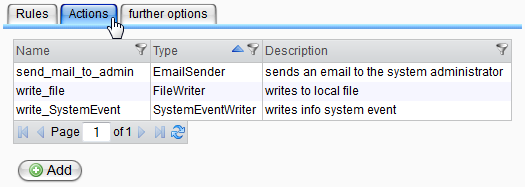
Double-clicking a table entry opens a detail view where you can modify the details of actions.
Clicking the "Add" button below the table opens an empty form to create a new action.
You can delete actions using the context menu of the table entries.
An action can only be deleted if it is not used by any rule. If it is referenced by a rule, an error message will indicate the name of the referencing rule.
Creating Actions
For every action type, you can create any number of instances, for example, to send an email to several responsible persons.
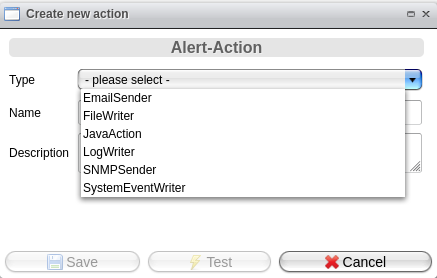
When creating a new action, the first step is to select the action type. Once you make your selection, the lower area of the window will display the appropriate input fields.
The name of an action serves as its identifier and must be unique!
During the save process, all required inputs are validated, and a warning will appear if any input is missing or incorrect.
Please note that the action type SNMPSender has been deprecated since Release 4.16.0.0 of Orchestra and will be removed in a future release. Do not use it anymore!
Editing Actions
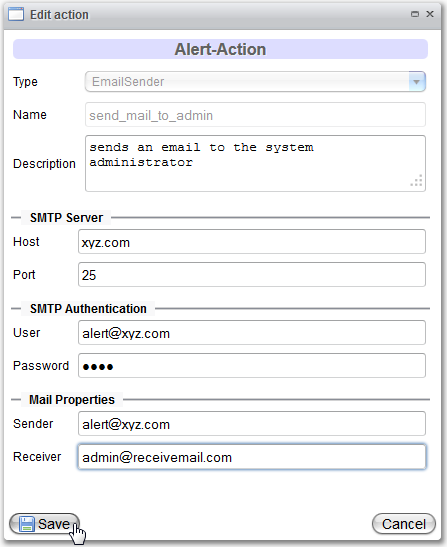
When viewing or editing actions, fields that cannot be changed will be disabled in the dialog. You can modify the description and type-specific data at any time.